
The Problem
In the world of maintenance and field operations, even small delays can ripple into costly downtime. Before Feeld.ai, every role—from engineers to field technicians had their own system and rhythm.
Technicians spent half their day chasing updates, not fixing problems.
Missed deadlines were the norm, not the exception.
Engineers used email. Technicians used paper. Supervisors used spreadsheets. Nothing connected.
Supervisors had no idea where technicians were or what they were working on until end of day.
When I joined the project, my goal was simple but ambitious: to bring clarity where there was clutter, and connection where there was disconnect.
The Goal
- Boost technician performance through intuitive, mobile-first task management
- Reduce equipment downtime by streamlining field-to-office coordination
- Improve operational efficiency with real-time access to inventory data
- Standardize field processes using digital checklists
- Unify communication and workflows across field and back-office teams
Role & Responsibilities:
-
End-to-end UX and UI design
-
Led React Native development
Collaborated cross‑functionally with:
- Mobile Dev Team
- Engineering Team
- Service and Maintenance Expert
- Stakeholders to validate flows
Empathy - Understanding the Field
Through contextual interviews and on-site observation, I identified four recurring failure points that drove inefficiency across every role.
Key Challenges
Frequent back-and-forth between technicians and supervisors via phone and email. No single source of truth.
Supervisors lacked real-time insight into technician location, task status, and progress.
Tracking equipment history and spare part availability required digging through spreadsheets.
Field technicians often worked in low or no connectivity environments. Apps needed to work offline.
The People Behind the Product
Raj spends 3 hours daily calling for spare parts approvals. Priya manages 15 technicians but only hears from them at shift end. Amit forecasts budgets blind — no historical data exists.
These aren’t job titles. They’re real people whose workdays were fragmented by tools that didn’t talk to each other.
Every screen, interaction, and workflow was tested against their actual environments — not conference room assumptions.
Map - From Chaos to Clarity
Empathy turned into direction through mapping.
This phase focused on mapping workflows, identifying dependencies, and translating them into intuitive flows and dashboards.
We developed early wireframes that visualized how data should move — from a reported issue to task assignment, execution, and completion tracking. Techniques like card sorting and journey mapping helped define task hierarchies and screen priorities.
Defining Design Goals:
- Efficiency in Workflow — Streamline daily operations by reducing manual data entry and redundant communication.
- Real-time Visibility — Build real-time updates even in low-connectivity environments.
- User Empowerment — Simplify task ownership through intuitive UI patterns and minimal cognitive effort.
- Consistency Across Platforms — Ensure a unified experience whether on mobile or web, with a focus on mobile-first design.

Once we understood the users’ challenges, we mapped the ecosystem — connecting workflows, emotions, and decisions to define a clear, human-centered design roadmap.
Wireframe & Prototype were created to outline the core features and user flows. They provided a visual representation of the design decisions and helped guide the development process and user testing. These wireframes and prototypes were iterated on based on user feedback, ensuring that the final product met the needs of its users.

Design - Bringing Goals to Life
The UI design emphasized clarity, legibility, and hierarchy. Each interaction was designed for minimal friction — intuitive icons, contextual actions, and dashboards that visualize performance at a glance.
The design goal was not only to make the system beautiful but to make complexity invisible — guiding users naturally through what’s next without mental overload.


Engineered a multi-view command center that flips between list, calendar, and live-map perspectives—turning a wall of scattered data into an at-a-glance war-room. Supervisors now spot schedule clashes, re-route technicians, and re-allocate parts in seconds, not hours.
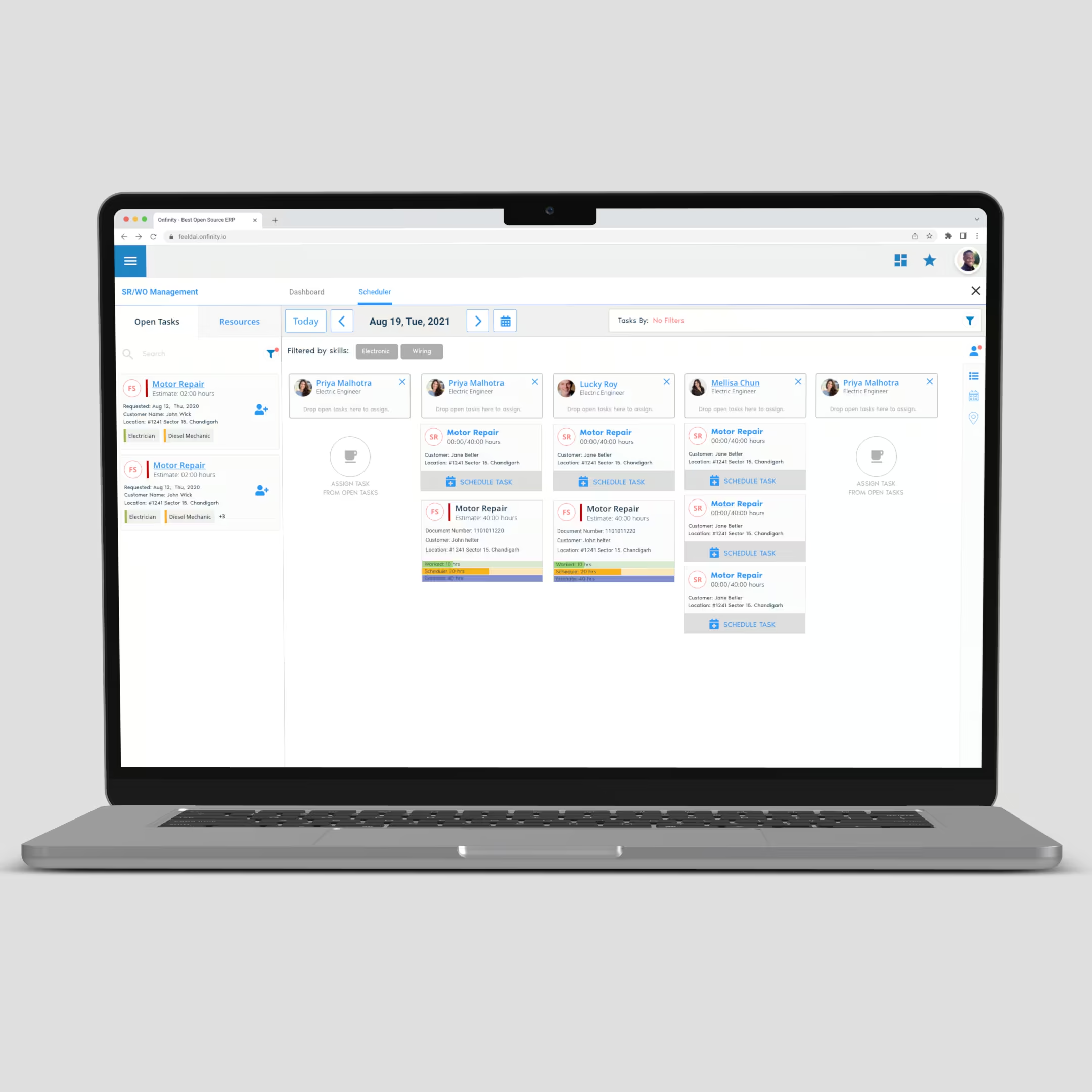
The result was a field service solution that streamlined maintenance tasks, optimized scheduling, and gave managers clear visibility into operations.
- Technicians could complete jobs faster, even offline.
- Supervisors gained real-time visibility into team performance.
- Customers benefited from reduced response times and reliable service.
The platform became a key enabler of operational efficiency, helping the organization cut costs and strengthen client satisfaction.
Design Impact in Numbers
Design is only meaningful when it drives measurable change.
After implementing the designed service and maintenance platform, both field technicians and managers experienced tangible improvements in efficiency, communication, and overall workflow clarity.
Here’s how thoughtful UX decisions turned into measurable business results:
Faster on-site resolution through streamlined task visibility.
Clear workflows and mobile-first UI improved adherence.
Better task handoffs reduced miscommunication and rework.
Microcopy and frictionless onboarding boosted adoption.
Faster response and clarity drove better client outcomes.
Predictive scheduling and visibility reduced idle time.
Metrics based on pilot rollout across 3 regions over 6 weeks.
These outcomes demonstrate that human-centered design isn’t just about usability — it’s a performance catalyst.
When empathy meets clarity, productivity follows. The Feeld.ai project proves that strategic UX and thoughtful interaction design can transform operational complexity into intuitive, measurable impact.
What I Learned
Working on this project highlighted the importance of designing for real-world constraints such as limited connectivity, time-critical tasks, and multiple stakeholder needs. I learned how critical it is to:
- Build offline-first solutions for mobile teams.
- Balance simplicity with advanced functionality for different user roles.
- Continuously validate designs with real user feedback to ensure adoption.
This project reinforced that good design is not just about aesthetics—it’s about empowering people to do their work better, faster, and more confidently.
“Design is not about making things look good — it’s about making work feel effortless.” — Amitpal Singh

